
EV Charger Not Working? 10 Checks Before You Call an Engineer
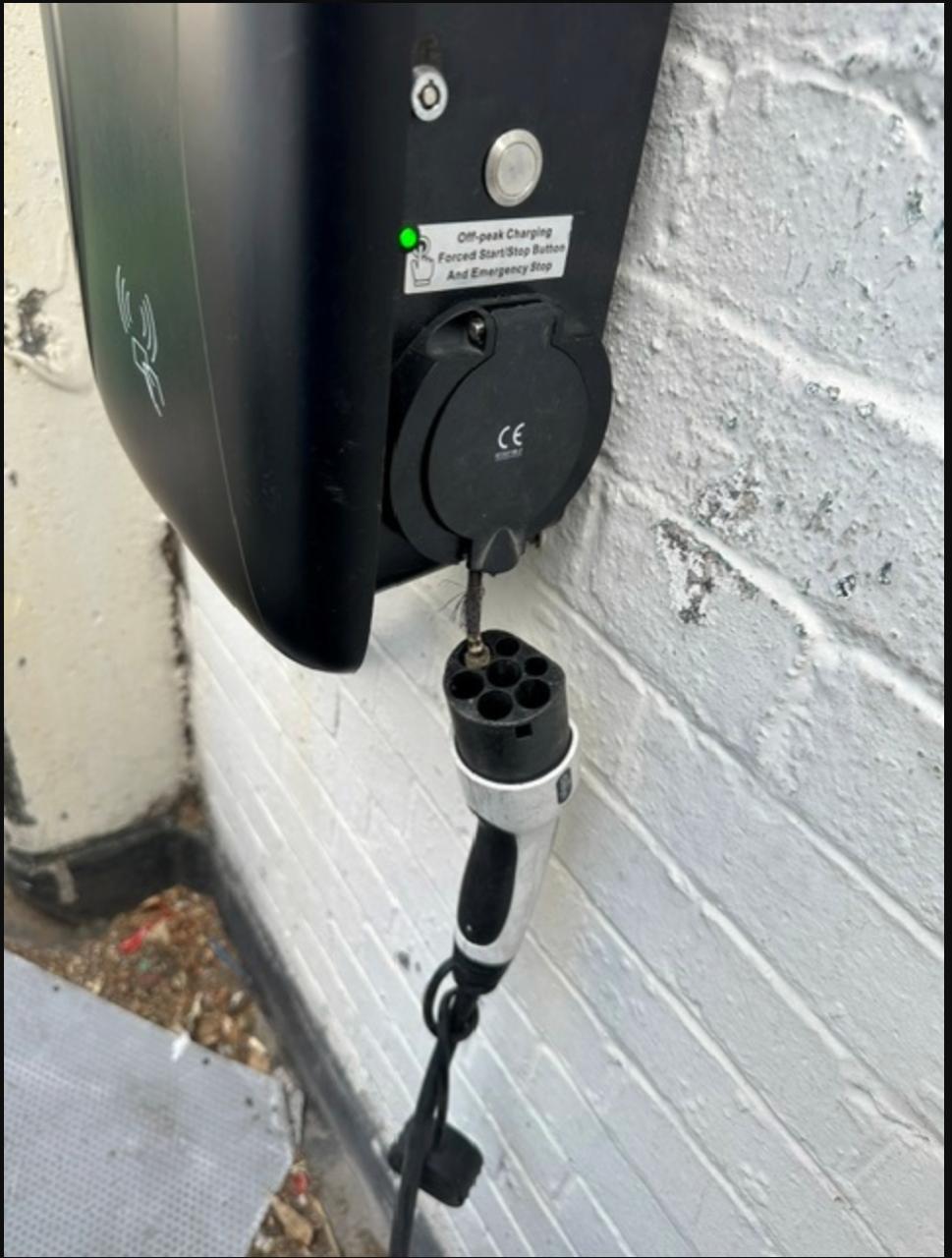
Most home charge points that "stop working" are not broken. They are scheduled, offline, plugged in wrongly, or protected by a device that is doing exactly what it was fitted to do.
This is the list our engineers work through, in the order they work through it. Nine of the ten checks are things you can safely do yourself in a few minutes. One of them is the point at which you should stop.
First, the thing everyone gets wrong
Search this problem and every guide tells you the same thing: switch the charger off at the breaker for thirty seconds and switch it back on.
That advice is fine — once. A single power cycle clears a hung controller and costs you nothing.
What almost nobody says is what it means when you have to keep doing it. An RCD or RCBO that trips repeatedly is not being temperamental. It is detecting a fault current — moisture in the socket, a damaged cable, a failing component, or a problem in the vehicle — and disconnecting the supply on purpose. Every time you reset it, you re-energise the fault.
The charger in the photograph above still had its green light on. From a metre away it looked perfectly healthy. The damage was entirely inside the socket, and it got there over weeks of being used after it should have been stopped. There are close-up photographs of what was left in our home EV charger repair guide.
The rule: reset once. If it trips again, stop and get it looked at.
The 10 checks
1. Is it the charger, the cable, or the car?
Before anything else, isolate which of the three is at fault. If you have a second cable, try it. If a friend or a public charger will take your car, try that. If the car charges elsewhere and another car charges at your unit, you have narrowed it down enormously — and if you do get in touch, this is the single most useful thing you can tell us.
2. Check your charging schedule
This is the most common "fault" we are called to that is not a fault at all. If you are on an off-peak EV tariff, the charge can be scheduled in three separate places: the charger's own app, the car's onboard settings, and sometimes the energy supplier's app. Any one of them can silently hold the charge until 00:30.
Check all three before assuming hardware. A car that starts charging the moment you press "charge now" does not have a broken charger.
3. Check the isolator and the consumer unit
Dedicated charge points usually have their own isolator near the unit, plus an RCBO or RCD in the consumer unit. Check both are on. If something has tripped, reset it once — and read the section above about what it means if it trips again.
4. Look inside the socket
Torch, ten seconds. You are looking for discolouration, browning, bubbled or melted plastic, green or white corrosion on the pins, or anything that looks scorched. Do the same on the plug face of the cable.
If you find any of that, stop here. That is not a reset problem.
5. Check the cable along its whole length
Run it through your hands. You are feeling for flattened sections where a wheel has gone over it, abrasion where it has dragged on the ground, cuts, and any area that felt warm during the last charge. Warm is normal. Hot is not.
6. Make sure the connector is fully home
A Type 2 connector has to seat completely before the charger will start. If it feels stiff, do not force it — stiffness usually means a worn latch or a swollen seal, and forcing it damages the contacts. Check for grit in the socket, and check the latch on the plug moves freely.
7. Check whether the cable is locked in
If the cable will not come out, that is normally the car, not the charger. Most vehicles lock the connector while charging, while the car is locked, or occasionally after a failed charge. Unlock the car, end the session in the app, and try again. Never pull hard on a locked connector.
8. Do not panic about the app
An offline charger is not necessarily a broken charger. Most units will still deliver a charge with no connectivity at all — you simply lose scheduling and monitoring. If the app is the only thing that is wrong, check your router, then the charger's WiFi credentials, and treat it as a convenience fault rather than an emergency.
9. Has anything changed on the supply lately?
Two things catch people out. A smart meter installation can disturb the CT clamp that the charger uses for load management, and the charger will then either refuse to start or throttle to a trickle. Solar or battery storage added after the charger can do the same. If your charger stopped working within days of electrical work in the house, that is where to look first.
10. Note exactly what the lights do
Before you call anyone, write down the LED behaviour: colour, whether it is steady or flashing, how many flashes, and at what point in the sequence it fails. Manufacturers encode real diagnostic information in that pattern, and it often tells an engineer what the fault is before they arrive.
Stop and get help if any of these are true
- The RCD or breaker trips again after one reset
- There is any browning, melting or scorching in the socket or on the plug
- You can smell hot plastic, or a fishy smell, after a charge
- The connector or cable is hot rather than warm
- There is visible damage to the cable's outer sheath
- Water has got into the socket, or the unit has taken a physical knock
- The unit is making a buzzing or crackling noise
None of those are things to work around. A charge point is a 7 kW connection on the outside wall of your house, and the failure mode when it goes wrong is heat.
What happens when you do call someone
An engineer will test the supply, the protective device, the charger's internals and the earthing arrangement, then load-test it properly rather than checking that a light comes on. We repair charge points of any make, not only the ones we manufacture, and because we build our own units we hold sockets, connectors and control components in stock — so a fault found on the visit can often be corrected on the same visit.
Depending on the station we can also fix the price before we start, rather than leaving it open-ended. The conditions are set out in the fixed-price repair guide.
Better still, do not get here
Most of what is on this page is preventable. Hang the cable on its holster instead of leaving it on the ground, dry the plug before it goes into the socket, close the socket cover when nothing is connected, and look inside it with a torch a couple of times a year. On a workplace or public site, that becomes a scheduled job — see EV charger maintenance and servicing.
If you have worked through the ten checks and it still will not charge, tell us what you found — and a photograph of the socket face saves everyone a visit.
Send us a message about your charger
Related: home EV charging repair · charge point repair service · EV charger maintenance